Projektor
Feature set / current build

A complete instrument for shaping light.

From the first corner you drag to the output you send live, Projektor keeps the core projection-mapping workflow inside one browser tab.

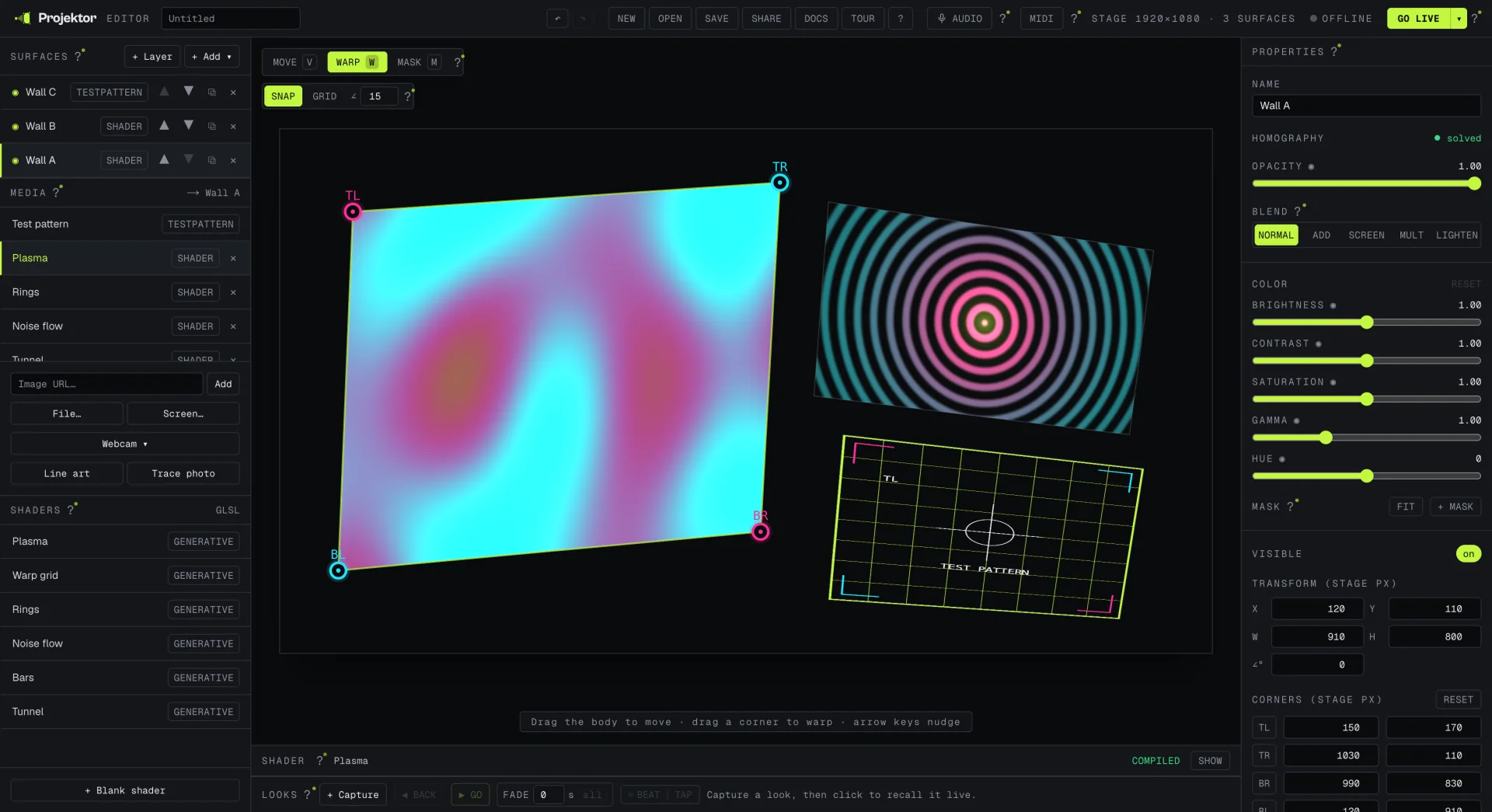
Projektor editor showing the surface list, shader gallery, mapped stage, Looks, and property controls
Actual product capture / current editorNo mock UI
Six connected systems

Build the picture, control the show, and keep the output moving.

Surfaces / warp01 / 06

Fit light to the shape in front of you.

Build with quads, triangles, ellipses, polygons, or a mesh-warp grid. Quad and ellipse surfaces use a perspective-correct homography; triangle, polygon, and mesh surfaces use a textured-mesh path.

  • Direct corner and control-point manipulation
  • Move, rotate, scale, multi-select, group, and duplicate
  • Snap controls plus precise keyboard nudging
Sources / GLSL02 / 06

Put live and generated media on any surface.

Assign an image, video, webcam, screen capture, line-art camera feed, test pattern, or live GLSL shader. The shader gallery and editor keep generative visuals inside the same instrument.

  • URL and local-file image or video sources
  • Window, tab, screen, and camera capture
  • Live shader editor with a built-in gallery
Masks / colour03 / 06

Composite the picture before it reaches the wall.

Layer surfaces with normal, add, screen, multiply, or lighten blending. Shape the result with polygon masks, soft edges, and per-surface colour controls.

  • Clip-to-shape and cut-a-hole masks
  • Brightness, contrast, saturation, gamma, and hue
  • Independent visibility, opacity, and z-order
Looks / control04 / 06

Prepare a show, then play it like an instrument.

Capture the current mix as a Look, recall it with a crossfade, and move between cues without rebuilding the stage. MIDI learn, beat-sync, and microphone-driven shader uniforms support hands-on performance.

  • Named Looks with live recall and crossfades
  • MIDI pads and faders mapped in the browser
  • Audio-reactive shader input and beat timing
Output / share05 / 06

Send a clean picture out, and the setup as a link.

Go Live opens a chrome-free output window that mirrors the editor on the same machine. Save a versioned .projektor file, encode a project into a #p= URL, or place it in an iframe.

  • Display picker in supported Chromium browsers
  • Autosave plus portable project import and export
  • Forkable links for URL-backed media and shaders
MCP / agents06 / 06

Expose the controls to an AI agent when you choose.

The repository includes an MCP server for reading the stage, taking screenshots, editing surfaces, assigning media, and capturing or recalling Looks. It is a local developer setup, not enabled on the public production editor.

  • Typed tools over the editor's existing state actions
  • Undo, validation, and output mirroring stay in the loop
  • Explicit confirmation for destructive or live actions
Under the surface

One scene. Two windows. One renderer.

The render engine consumes plain scene state and imports no React, Next.js, or Zustand. The editor and projector output use that same boundary instead of maintaining separate visual paths.

  1. 01 · Input

    Media providers

    Files, URLs, capture devices, test patterns, and GLSL become textures.

  2. 02 · Scene

    Plain state

    Surfaces, geometry, masks, colour, and cues live in one serializable scene.

  3. 03 · Render

    Raw WebGL2

    A framework-free engine draws the same scene for editing and output.

  4. 04 · Output

    Same-machine mirror

    BroadcastChannel keeps the chrome-free projector window in step.

Ready / Stage 01

The fastest way to understand it is to move a corner.

The editor opens with a live test surface. No signup, installer, or watermark.